This session runs two ways. Pick the one that matches where you're sitting right now — you can switch any time from the top bar.
CLASS 1 · P 1/15
PgDn next · PgUp back
UNIT 1 · WEB BASICS, HTML & CSSCLASS 1 OF 48NO CODE TODAY
Why the web needs structure.
Before a single tag gets typed, today answers one question: what actually happens between your thumb tapping an app and something appearing on the screen? Once you can see that clearly, everything else in this course has a place to live.
Today's promise
Zero jargon, zero HTML, zero installs. If a term hasn't been explained in plain English first, it doesn't get used. By the end of the hour you'll be able to explain — to a friend outside CSE — what the internet is, what the web is, why they're different, and what really happens when you open a website.
Tell the internet and the web apart — and know which one WhatsApp needs
Explain what a network is, in your own words, with no textbook terms
Say what a website actually is — files, a server, and copies
Point at the client and the server in any app on your phone
THE HOUR, IN ORDER
01Why the internet matters to you — through apps you used this morningIDEA
02What a network is, in plain EnglishIDEA
03How we got here — 1969 to today, in four stopsIDEA
04Internet vs World Wide Web — the confusion, resolved for goodIDEA
05Your turn — sort six everyday scenarios: Web, or just a network?TRY IT
06What a website actually is — three plain factsIDEA
07Client and server — who asks, who answersIDEA
08Your turn — one app you used today, taken apart in your own wordsTRY IT
09A guided look around Chrome — the tool you'll use all semesterTOUR
Part A · The web, from zero
Where the whole course begins.
Unit 1 is the ground floor of everything you'll build this semester. Over the next twelve classroom sessions and three labs, three ideas get built up in order — and each one only makes sense because of the one before it.
How the web workstoday & Class 2 — no code, just the machinery
Structure with HTMLClasses 3–8 — real pages, built tag by tag
Style with CSSClasses 9–12 — making structure look intentional
Today is deliberately the only session in the course with no code at all. That's not a soft start — it's the foundation being poured before the walls go up.
Start where you already are
You used the internet before breakfast.
Nobody in this room needs convincing that the internet matters. What you haven't done yet is look at the apps you use every day and ask: what is actually moving under the surface? Take three you almost certainly touched today.
Food delivery tracking
That little dot crawling across the map is your delivery partner's phone reporting its location every few seconds — and your phone asking for the latest position, over and over, without you doing anything.
A social feed
Every flick of your thumb quietly fetches fresh posts, images, and like-counts from computers that might be on another continent — assembled into a feed in the time it takes the animation to finish.
A chat message
Reached college? ✓✓
Yes, in class now ✓✓
One grey tick: your message reached a distant computer. Two ticks: that computer passed it on to your friend's phone. The ticks are a live status report on a journey you never see.
ONE ERRAND, TWO DECADES APART
BOOKING A TRAIN TICKET · AROUND 2004
Travel to the reservation counter — often across town — and stand in a queue that could run past an hour.
Fill a paper form by hand; if the train was full, ask the clerk to check alternatives one by one.
Seat availability lived inside the railway's computers — only a clerk at a terminal could see it for you.
Counter closed at night and on holidays. The information existed — you just couldn't reach it.
THE SAME TICKET · TODAY
Open the booking site or app from your bed at 11 p.m. — your device asks the railway's servers directly.
Availability for every train, class, and date answers back in seconds — the same data the clerk saw, now answering you.
Payment, seat selection, and the ticket itself all arrive as responses to your device's requests.
No queue, no counter hours — the server answers millions of clients at once, around the clock.
Nothing about the railway's information changed between these two columns — the trains, seats, and fares were always in a computer somewhere. What changed is who gets to ask it questions: in 2004, only a clerk's terminal; today, any client anywhere. That shift — opening a system's answers to everyone's devices — is the single biggest thing the web did, and it's the shift you'll be on the building side of by Unit 4.
Every one of these is the same trick performed at different speeds: one device asks, a distant computer answers. This course teaches you to build both sides of that conversation.
GOING DEEPER
Notice what all three examples have in common: you never asked for the machinery. You didn't request a location update, refresh the feed, or check delivery status — the apps did the asking for you, silently and repeatedly. A big part of becoming a developer is learning to see the invisible questions an app is asking on your behalf. Start today: every time an app "just updates", ask yourself — what did it request, and from where?
Also worth noticing: none of the three needs you to know where the answering computer is. It could be in Mumbai, Singapore, or Virginia. That indifference to physical location is one of the internet's most useful properties — and by Unit 5, an app you built will make use of it too.
First building block
A network is just devices that can pass things to each other.
Strip away every acronym you've ever heard, and that's the whole definition. Two computers with a way to exchange data — a cable, a Wi-Fi signal, anything — form a network. Everything else is scale.
A two-device network you already live inside: your home Wi-Fi.
The postal analogy
Think of the postal system. A letter doesn't fly straight from your house to your cousin's — it goes to a local post office, gets sorted, moves through bigger sorting hubs, and comes down the other side to a post office near your cousin, then to their door. No single postman knows the whole route; each one only knows the next hop.
Data moves exactly this way. Your phone hands a small packet of data to your router, the router hands it to your internet provider, and it hops from network to network — each hop only deciding where to pass it next — until it arrives. The internet is not one giant machine. It's millions of small networks that agreed to pass each other's letters.
Your home Wi-Fi — a network of ~5 devices The VCE campus network — thousands The internet — billions, worldwide
LIVE DEMO · ONE PACKET'S JOURNEY — HYDERABAD TO A US SERVER — WITH THE REAL MATHS
LEG 1Hyderabad Chennai — down the fibre to the coast≈ 630 km
LEG 2Chennai Singapore — an undersea cable on the seabed≈ 2 900 km
LEG 3Singapore US west coast — the Pacific crossing≈ 13 600 km
TOTAL ≈ 17 130 km · light in fibre ≈ 200 000 km/s · 17 130 ÷ 200 000 ≈ 0.086 s one way — under a tenth of a second, and that's why the page you ask America for appears before you finish blinking.
Every hop is a real machine deciding only one thing: where to pass it next — the postal analogy, running at the speed of light.
GOING DEEPER
The word internet is literally built from this idea: inter (between) + net(works) — a network of networks. Your home Wi-Fi is one network. The college campus is another. Your mobile provider runs enormous ones. The internet is what you get when all of them agree on a common way to pass data across their borders — the way countries with different postal services still deliver each other's international mail.
You'll meet the formal names for these agreements later in the course. For now, one honest sentence is enough: the agreement is called a protocol — a set of rules both sides promise to follow so the handoff never fails. Class 2 introduces the single most important one for us by name.
ADD-ON · THREE NETWORKS, THREE GUEST LISTS
Internet, intranet, extranet — same technology, different door policy.
All three are built from exactly the networks you just met — same cables, same packets, same postal analogy. The only difference is who is allowed in. Think of VCE itself: the college has spaces for everyone, spaces for members only, and spaces for invited partners.
INTERNET · PUBLIC
The open road outside the campus gate. The worldwide network of networks — anyone with a connection can reach it, no membership asked. The websites you visit, the videos you stream: all of it travels here.
WHO GETS IN: everyone on Earth with a connection
INTRANET · PRIVATE
The campus behind the ID-card gate. A private network using the same web technology, but sealed inside one organisation. VCE's internal portal — attendance, internal marks, notices — works only on campus or with a college login. Infosys, TCS, every bank: each runs one.
WHO GETS IN: members of ONE organisation only
EXTRANET · INVITED GUESTS
The visitors' gate with a guest pass. A slice of an organisation's private network deliberately opened to specific outsiders — partners, suppliers, customers. When a placement company's HR logs into a VCE recruitment portal, or a supplier checks a factory's stock system: that's an extranet.
WHO GETS IN: one organisation + its invited partners
NETWORK
OWNED BY
WHO CAN ACCESS
ONE-LINE EXAM ANSWER
Internet
Nobody — a global federation of networks
Anyone, anywhere
A public, worldwide network of interconnected networks.
Intranet
One organisation
Its members only, behind a login/firewall
A private network inside one organisation, using internet technologies.
Extranet
One organisation
Members + specifically authorised outsiders
A controlled extension of an intranet to trusted external partners.
GOING DEEPER — THE SENTENCE THAT LOCKS ALL THREE
An extranet is not a fourth technology — it is an intranet with a guest list. All three run the very same protocols and the very same postal-style packet hops you watched above; the difference is purely access control: who the gate lets through. Exam phrasing worth memorising: internet = public, intranet = private, extranet = private-plus-invited.
A common trap: "intranet" does not mean disconnected from the internet. Most intranets ride on internet links — they are simply fenced off by logins and firewalls, the way a gated community still uses the public road network to receive its mail.
Four stops, fifty-six years
How a lab experiment became half the planet's habit.
You don't need to memorise dates. You need the shape of the story — because the web's biggest design decisions only make sense once you know what problem each era was solving.
1969
ARPANET sends its first message — and crashes.
A research team in California tries to send the word LOGIN from one university computer to another. The system crashes after two letters. The first message ever carried by the internet's ancestor was, in full: "LO". Four computers were on that network. Today's estimate is tens of billions.
1970s–80s
Networks learn to talk to other networks.
Universities and labs build their own separate networks — and immediately hit the postal problem: each one speaks its own dialect. The fix, agreed through the 70s and switched on across ARPANET on 1 January 1983, is a shared set of rules for passing data between different networks. The network of networks — the internet — properly begins here.
1989–91
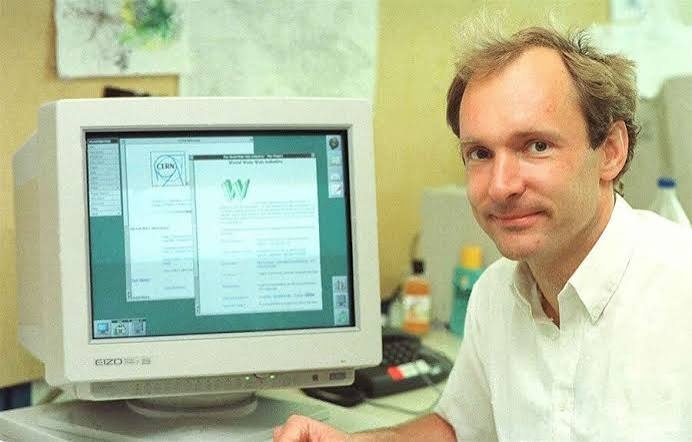
Tim Berners-Lee invents the World Wide Web.
At CERN, the physics lab in Geneva, a British engineer named Tim Berners-Lee faces a very ordinary frustration: thousands of researchers, thousands of documents, no good way to link them together. His 1989 proposal — politely marked "vague but exciting" by his boss — becomes, by 1991, the three inventions this course teaches: a way to write linked documents, a way to address them, and a way to fetch them. The web is not the internet — it's this system, running on top of the internet.
REAL PHOTOGRAPH · TIM BERNERS-LEE · CERN, EARLY 1990s
Today
More than five billion people online.
Well over five billion people use the internet, and most of what they do — every site, every link, every page an app loads inside itself — still runs on Berners-Lee's three inventions, barely changed in spirit since 1991. That's the machinery you begin learning to operate this week.
WHAT THE WEB ACTUALLY CHANGED FOR AN ORDINARY PERSON
FINDING THINGS
INTERNET ONLY · PRE-1991You had to already know the exact name of the machine holding what you wanted, and the exact commands to reach it. The internet moved data brilliantly — for the trained few who knew where to point it.
WITH THE WEB ON TOPLinks. Every page can point at any other page, anywhere on Earth. You find things by following a chain of clicks — no machine names, no commands. Curiosity replaced training as the entry requirement.
READING THINGS
INTERNET ONLY · PRE-1991Files arrived raw — plain text you had to download first, open in something else, and read with no formatting, no images alongside, no way to jump to a related document mid-sentence.
WITH THE WEB ON TOPThe page is the reading experience: text, headings, images, and links live in one view, rendered instantly by the browser. The document and the doorway to the next document became the same thing.
PUBLISHING
INTERNET ONLY · PRE-1991Effectively closed to individuals. Putting something where the world could read it meant institutional access and specialist knowledge — the audience was other experts, not the public.
WITH THE WEB ON TOPAnyone who can write a page can be read worldwide — one document, one server, five billion potential readers. This is exactly the doorway you personally walk through in Unit 5, when your project goes live.
GOING DEEPER
The world's first website is still online, preserved at its original address: info.cern.ch. Visit it after class. It has no images, no colours, no layout — just text and links. Two things to notice while you're there: first, how fast it loads compared to modern sites (worth remembering when your own pages get heavy later in the course); second, that a page built in 1991 still opens perfectly in a 2026 browser. That backwards compatibility is a deliberate design value of the web — and it's the reason the HTML you learn in Class 3 will still work decades from now.
The most common beginner confusion
Internet vs Web: roads vs the shops on them.
People say "the internet" when they mean "the web" every single day, and it mostly doesn't matter — until you're the one building things, when the difference becomes the difference between two entire halves of this course.
The InternetTHE ROADS
The physical and wireless infrastructure — cables under oceans, towers, routers, satellites
Its one job: move data between any two connected devices, anywhere
Carries everything: chat messages, video calls, online games, email, app traffic — and the web
Existed for about 20 years before the web was invented
The World Wide WebTHE SHOPS ON THOSE ROADS
A service that runs on top of the internet — one of many
Made of pages, joined by links, each with an address, viewed in a browser
When you "visit a website", you're using the web — riding on the internet's roads
Invented in 1989–91, long after the roads were laid
The test that settles any example: could this work with the internet's roads but without pages, links, addresses, and a browser? A video call can — it's traffic on the roads, but it never visits a shop. Opening any website cannot — that is the shop. Hold onto this test: you're about to use it six times.
The internet moves data. The web is one particular thing built out of moved data. Units 1–3 of this course build the shopfronts; Units 4–5 put you in charge of the goods behind the counter.
Your turn
Sort these six scenarios.
THE TASK · 5 MINUTES
For each everyday scenario below, decide: does it need the Web (pages, links, addresses, a browser fetching them) — or just a network (data moving between devices, no web involved)? Use the roads-vs-shops test. Fair warning: one of the six is a trap.
Sending a WhatsApp message
Typed on your phone, delivered to a friend across the city.
YOU GOT IT CHECK THE ANSWER BELOW
Reading a downloaded PDF in flight mode
Saved yesterday; opened today with every radio switched off.
YOU GOT IT CHECK THE ANSWER BELOW
Streaming a YouTube video in Chrome
Typed youtube.com into the browser and pressed play.
YOU GOT IT CHECK THE ANSWER BELOW
Sharing a photo over Bluetooth
Phone to phone, standing next to each other, no SIM, no Wi-Fi.
YOU GOT IT CHECK THE ANSWER BELOW
Paying a shopkeeper by UPI
Scan the QR code, enter the PIN, hear the confirmation beep.
YOU GOT IT CHECK THE ANSWER BELOW
Sharing files over hostel Wi-Fi — internet down
The broadband is dead, but laptop-to-laptop transfer on the same Wi-Fi still works.
YOU GOT IT CHECK THE ANSWER BELOW
BEFORE YOU PEEK
Tap WEB or NETWORK on every card above before opening the answer sheet — your picks will be checked against it automatically. If you're torn on any card, apply the test out loud: "Is anything here a page, with an address, fetched by a browser?"
Answer sheet
The six, settled.
Locked until you've made your calls — no accidental spoilers.
NETWORK
1 · WhatsApp message
No page, no address bar, no browser. Your message travels the internet's roads directly between WhatsApp's computers and two phones. It absolutely needs the internet — but nothing about it is the web. This is why the class question "is WhatsApp the web?" gets a confident no.
NEITHER — THE TRAP
2 · Downloaded PDF in flight mode
Every radio is off. Nothing moves between devices at all — so it isn't even a network scenario, let alone a web one. The file already lives on your phone. If you caught this, you've understood the definition better than the question expected you to.
WEB
3 · YouTube in Chrome
You typed an address, a browser fetched a page, and the video arrived through that page. All four shop features present: page, link, address, browser. The only clear-cut web scenario of the six — and notice it also uses the network, because the web always rides on the roads.
NETWORK
4 · Bluetooth photo share
Two devices passing data directly — the smallest network you'll ever see, population: two. No internet involved, no web involved. A useful reminder that "network" doesn't mean "online".
NETWORK
5 · UPI payment
The UPI app talks over the internet to bank systems, which talk to each other — machine-to-machine conversations the whole way. No page is fetched, no browser opens. Serious infrastructure, zero web. (A bank's website, on the other hand, would be the web — same roads, different vehicle.)
NETWORK
6 · Hostel Wi-Fi with the internet down
The local network is alive and passing files happily — proof that a network doesn't need the internet to exist. The internet is a network of networks; this one has simply lost its connection to the others. The roads inside the colony still work even when the highway is closed.
The scoreboard: one web, four network, one trap. If most of your picks matched, the roads-vs-shops test is already working for you. If they didn't — better here than in the internals, and the test is worth re-reading once more before Class 2.
Demystifying the thing itself
A website is three plain facts.
"Website" sounds like a single object floating somewhere. It isn't. Strip the mystery away and every website you've ever visited reduces to exactly this:
1It's files.
Ordinary files, the same kind of thing as the PDFs and photos on your phone — just written in languages a browser understands. A small site might be five files; a huge one, millions. But files, always.
2They sit on a server.
A server is not a mythical machine — it's a computer, usually in a big air-conditioned building, whose only job is to stay on and hand out those files to whoever asks. "Server" describes the job, not special hardware.
3Your browser gets copies.
When you visit a site, the original files never leave the server. Your browser receives copies, and builds the page you see out of them, right there on your device. Close the tab and your copies are discarded; the original is untouched.
TRY THE MATHS · ONE ORIGINAL, ANY NUMBER OF VISITORS
Drag the slider — watch what happens to the original as visitors pile up.
1VISITORS RIGHT NOW
1ORIGINALS ON THE SERVER — ALWAYS
1COPIES OUT IN THE WORLD
copies = visitors · originals = 1, forever — a million viewers never "use up" the video, because nobody is touching the original.
Why "copies" is the fact that matters most
It explains things you've wondered about for years. Why can a million people watch the same video at once without "using it up"? Copies. Why does a page you loaded keep working for a moment when the Wi-Fi drops? You're looking at your copy. Why doesn't the site owner know you took a screenshot? Because it happened to your copy, on your device — the server was never involved.
And one more, which becomes personal by mid-semester: when you edit a website's files on the server, every visitor from that moment on gets copies of the new version. That single idea — change the original once, every visitor receives it — is what you'll experience firsthand the day your own project goes live in Unit 5.
GOING DEEPER
How does your browser know which server to ask, out of millions? Every website has an address — the thing you type in the bar, like vce.ac.in. Behind the scenes, that friendly name is looked up and translated into a numeric address that identifies one machine on the internet, the way "Vasavi College of Engineering, Ibrahimbagh" translates to one plot of land in Hyderabad. The lookup system that does this translation is a Class 2 topic — but next time you type an address, know that a translation step is happening before anything else.
The two words this whole course hangs on
Client and server: who asks, who answers.
You've now seen the pattern four times without the names. Time to name it. The device that asks is the client. The computer that answers is the server. That's the entire definition — everything else is detail.
CLIENT
your phone / laptop — it asks
CLIENT ASKSCan I have the college homepage?
SERVER ANSWERSHere — copies of everything you need.
CLIENT ASKSAnd the photo on it?
SERVER ANSWERSHere's that too.
SERVER
a distant computer — it answers
The rule worth underlining: the client always starts.
Servers never barge in. A server can sit holding the world's most interesting files, but it says nothing until a client asks. Every page load, every image, every feed refresh in this morning's examples began with a client's question. Burn this in now, because it quietly shapes everything: how pages load (Unit 1), how apps fetch data (Units 2–3), and how you'll design the answering side yourself (Unit 4).
"But notifications arrive without me asking — doesn't the server start those?"
Sharp question, and the honest answer is: it still doesn't. Your phone maintains a standing arrangement — think of it as the client asking, in advance, "keep this line open and pass along anything for me." The delivery rides on an arrangement the client set up. The deeper machinery is beyond today, but the principle survives intact: no server speaks to a device that never opened the conversation.
Named next class: the exact language clients and servers speak — and your first HTML file.
Your turn
One app you used today, taken apart.
THE TASK · 4 MINUTES
Pick any one app or site you personally used today — not one from this lesson. In your own words, no technical terms required, answer the three questions below. If you can do this for an app nobody explained to you, today's ideas are genuinely yours.
1
Who was the client — which of your devices did the asking?
2
What did your device ask for? Name the actual thing that appeared on screen.
3
What did the server send back — and how do you know it came from somewhere else and wasn't already on your phone?
STUCK?
The third question is the one that catches people. A reliable clue that something came from a server: it could have changed since you last looked. Today's weather, a new message, a price, a live score — your phone can't have known those in advance. If the content can surprise you, a server sent it.
Answer sheet
Two model answers — compare, don't copy.
Write yours first — the comparison is the whole point.
MODEL ANSWER A · GOOGLE MAPS ON THE WAY TO COLLEGE
Client: my phone, running the Maps app. It asked for: the route to college and the current traffic along it. The server sent back: the route line and the red/orange traffic colouring. I know it came from a server because my phone cannot possibly know, on its own, that there's a jam near the flyover right now — that information didn't exist anywhere until other people's phones reported it a few minutes ago.
MODEL ANSWER B · CHECKING RESULTS ON THE COLLEGE SITE
Client: my laptop's browser. It asked for: the results page, after I typed the college address and clicked through to it. The server sent back: a copy of that page with my marks on it. I know a server was involved because the marks were published yesterday — they weren't on my laptop before, and my friend saw the same page from her hostel at the same time, which only makes sense if we both received copies from one shared original.
Grade your own answer — three checks:
Did you name a device, not a person, as the client? "Me" is who wanted it; the client is the machine that asked.
Was your "asked for" something concrete? "Data" is too vague — "the last 20 posts", "today's menu", "the OTP" is the level to aim for.
Did your server evidence involve change or distance? The strongest answers say "it couldn't have been on my phone already, because…" — if yours does, full marks.
The honest career picture
Why a fresher should care about today, specifically.
No inflated promises here — you'll get the real picture, because you can verify every part of it yourself on any job portal today.
Open any "developer" posting — the words are already there.
Search fresher roles on any hiring portal after class: "web developer", "full stack", "frontend", "backend". The postings assume, without explaining them, the exact words from today — client, server, web application. Today you started speaking the language the industry lists its jobs in.
Almost every software job touches this, even "non-web" ones.
Mobile apps talk to servers. Data pipelines feed dashboards viewed in browsers. Even game backends are client-server systems. The asking-and-answering pattern from this hour is the connective tissue of nearly every fresher role — which is why this course exists in your fifth semester and not as an elective.
By the end, you'll hold proof — not just a grade.
This course ends with a real application, built by you, running live on the internet at an address you can put in a resume. Interviewers can open it. For a fresher, one working deployed project answers questions that no percentage on a marksheet can.
WHERE TODAY SHOWS UP IN A JUNIOR DEVELOPER'S FIRST WEEKS
1
Week 1 · Onboarding: "open the Network tab and watch what the app asks for."
A standard first task at product companies is tracing one screen of the team's own app: open the browser's developer tools, reload, and read the list of requests the client fired and the answers the servers returned. That entire exercise is today's client-asks/server-answers picture — plus the tool you meet in the next section of this very class.
2
Week 2–3 · The first bug ticket is usually a which-side question.
Real tickets read like: "user's order total is wrong on the confirmation screen." Step one is always the same triage — did the server send the wrong answer, or did the client display a right answer wrongly? A junior who can even ask that question cleanly stands out immediately, and it's nothing more than today's two words applied under pressure.
3
Week 4 · Standups run on this vocabulary.
Teams split work as "frontend" (the client side — Units 1–3 of this course) and "backend" (the server side — Unit 4). Daily standup sentences like "the frontend's ready, waiting on the backend endpoint" only parse if the client/server split is second nature. After today, it's on its way to being yours.
TODAY'S TWO WORDS, STRETCHED ACROSS THE SEMESTER
UNIT 1
HTML & CSSWhat the server's files are made ofCLIENT SIDE
UNIT 2
JavaScriptMaking the client's copy come aliveCLIENT SIDE
UNIT 3
ReactBuilding serious client interfacesCLIENT SIDE
UNIT 4
Node, Express & MongoDBYou become the one who answersSERVER SIDE
UNIT 5
REST & AWSBoth sides talking, live on the internetTHE ROADS
A guided look around
Chrome is about to become your workshop.
You've used a browser for years as a window. From Class 2 onwards you'll use it as a tool — so let's walk around it once, deliberately, and name the parts that will matter. Six stops.
123456
Vasavi College of Engineering
New Tab
vce.ac.in
New tab CTRL+T
History
Downloads CTRL+J
More tools ▸ Developer tools F12
Settings
Illustration drawn to match Chrome's current desktop layout — open the real Chrome beside it and the parts sit in the same places.
1
Tabs
Each tab is its own independent visit — its own page, its own copies, its own conversation with a server. From Class 3 you'll keep two open side by side: your code in one world, its result in this one.
2
Back, forward, reload
Reload is the one to befriend: it asks the server for fresh copies of everything. All semester long, your edit-then-check rhythm will be: save the file, reload the page. Thousands of times.
3
The address bar
Where every client conversation begins. The padlock means the conversation is encrypted in transit — more on that in Class 2. Note it accepts both addresses and searches; a real address takes you straight to the server, no search engine in between.
4
Your profile
Chrome keeps bookmarks, history, and saved logins per profile. Worth knowing on shared lab machines: check whose profile is active before signing into anything, and prefer a Guest window when in doubt.
5
The three-dot menu
Everything Chrome can do that doesn't have a button lives here. The item highlighted in the illustration — More tools, then Developer tools — is the door to the browser's workshop mode.
6
Developer tools
The panel professionals keep open all day: it shows the page's structure, every request the client made, and what came back. Keyboard shortcut: F12 — or Ctrl+Shift+I on Windows, Cmd+Option+I on Mac.
60-SECOND TRY · ON ANY COMPUTER, AFTER CLASS IF NOT NOW
Open Chrome and go to any website you like.
Press F12. (Laptop keyboards sometimes need Fn+F12 — or use Ctrl+Shift+I.)
A panel opens beside or below the page. Don't touch anything in it — just look at it once, then press F12 again to close it.
You'll know it worked when: a dense panel full of code and tabs appears attached to the page, and pressing F12 again makes it vanish. That's the whole task — you opened the workshop and closed it. From Class 3, we start actually using what's inside.
Closing the hour
What you can now do — that you couldn't at 9 a.m.
Explain the difference between the internet and the web with the roads-and-shops test — and apply it to any new scenario.
Define a network in one plain sentence, and explain why the internet is a network of networks.
Tell the web's origin story in four stops — ARPANET's "LO", networks joining up, Berners-Lee at CERN, five billion people.
State what a website actually is: files, on a server, delivered as copies.
Point at the client and the server in any app — and defend the rule that the client always starts.
Files created today: none — by design.
Today built the mental model everything else attaches to. Class 2 changes that permanently: you'll meet the language clients and servers actually speak, install your code editor, and write your very first web page — and meet the project that will still be growing in Unit 5: the online food court for our campus, Poshtik Campus. From Class 2 onwards, you leave every session with something that runs.
YOUR FOLDERS AFTER TODAY — NOTHING YET, ON PURPOSE
Desktop\ <- exactly as it was this morning
├─ fswd-practice\ <- doesn't exist yet · born in Class 2 · sandbox, never a git repo
└─ poshtik-campus\ <- doesn't exist yet · born in Lab 1 · a git repo from its first day
GIT? — nothing to commit when nothing was created. The two-folder discipline begins in Class 2 with the sandbox: fswd-practice\ is scratch paper (never committed). The real project, poshtik-campus\, is born in Lab 1 — a git repo from day one, every meaningful change committed.
Before next class — three 15-minute pieces of homework:
VISIT HISTORY
Open info.cern.ch — the first website ever made, still at its original address. Click three links. Notice what it has (text, links) and everything it doesn't (images, colour, layout).
SPOT THE PATTERN
Catch yourself using any three apps tomorrow and silently name the client, the ask, and the answer for each. Ten seconds per app — the goal is making the pattern automatic.
ONE JOB POSTING
Find one fresher web-developer posting on any portal. Count how many words in it you now recognise from today. Keep the link — you'll re-read that posting in Unit 5 and understand far more of it.
You've been a client your whole life. This course is the story of learning to answer.
EXIT TICKET · ANSWER BEFORE YOU LEAVE
In one sentence: why does sending a WhatsApp message need the internet, but not the web? If your sentence mentions roads and shops — or pages and browsers — you've earned the door.